Your Support Tickets Are Living in Your Inbox — and That’s a Problem
Running customer support from your inbox works until it doesn’t. Here’s why customer support tracking matters, even for a small shop.
For a long time, “customer support” in my small business meant my email inbox. A customer messaged, I replied when I saw it, and I called that a support system. It worked fine — until it didn’t. Messages started slipping through. I’d forget to follow up. A customer would reference an earlier conversation I had no record of. And if you’d asked me how quickly I responded on average, or how happy my customers were, I’d have had no answer at all. That’s when I learned that an inbox is not a support system, and that even a tiny operation benefits from real customer support tracking. Here’s why.
An inbox is where support goes to get lost
The fundamental problem with running support from an inbox is that email isn’t built for it. An inbox is a stream, and streams bury things. A message you meant to follow up on scrolls out of view. A complex issue that needs several steps gets lost between replies. Two team members both think the other one handled it, so nobody does. There’s no clear status for anything — is this resolved, waiting, or forgotten? The inbox doesn’t know, and neither do you.
For a shop with a handful of messages a day, this seems manageable. But even at small volume, things slip — and a dropped customer message is a lost sale or an angry review. The inbox model doesn’t fail loudly; it fails quietly, one forgotten ticket at a time, and you only notice when a customer is upset that you never got back to them.
What a support tracker actually gives you
Moving support out of the inbox and into a proper tracker changes three things immediately.
First, nothing gets lost. Every request becomes a logged ticket with a clear status — open, in progress, or resolved. You can see at a glance everything that’s still waiting on you. The “did I forget to reply to someone?” anxiety disappears, because the answer is right there.
Second, you get accountability and history. Every interaction is recorded, so when a customer references an earlier conversation, you have it. If you have any help, you can see who’s handling what. Nothing depends on someone remembering.
Third — and this is the one people underestimate — you get visibility into how you’re actually doing. How fast do you respond? How many tickets are you getting, about what? Are customers satisfied? An inbox can’t tell you any of this. A tracker can, and that visibility is the difference between running support blind and running it deliberately.
The metrics that turn support from reactive to strategic
Once your support is tracked, a few numbers transform how you operate:
- Response time — how quickly you reply. This single metric drives customer satisfaction more than almost anything, and you can’t improve what you don’t measure.
- Ticket volume and categories — how many requests you get and what they’re about. When you see that a third of your tickets are the same shipping question, you can fix the root cause (clearer product info, a better FAQ) and eliminate the tickets entirely.
- Customer satisfaction (CSAT) — how happy customers are with your support. The ultimate scorecard, and a leading indicator of reviews and repeat business.
These numbers turn support from a reactive chore into a strategic advantage. You stop just answering messages and start improving — faster responses, fewer repeat issues, happier customers. That’s a competitive edge, especially for a small business where great support is something you can actually out-do the big players on.
You don’t need to be big to need this
The instinct is to think support tracking is for companies with big teams and thousands of tickets. It isn’t. A solo Etsy shop or a small e-commerce store benefits enormously — arguably more, because for a small business, every customer relationship matters and every dropped message hurts. You don’t need enterprise software or a support team. You need a simple, organized system so that no customer ever falls through the cracks and you can see how you’re doing.
A note on customer data
One responsible aside: a support tracker holds customer information, so keep it in a secure, private account and follow your local data-privacy rules on storing and handling customer data. Good organization and good data protection go together.
If you want a system ready to go
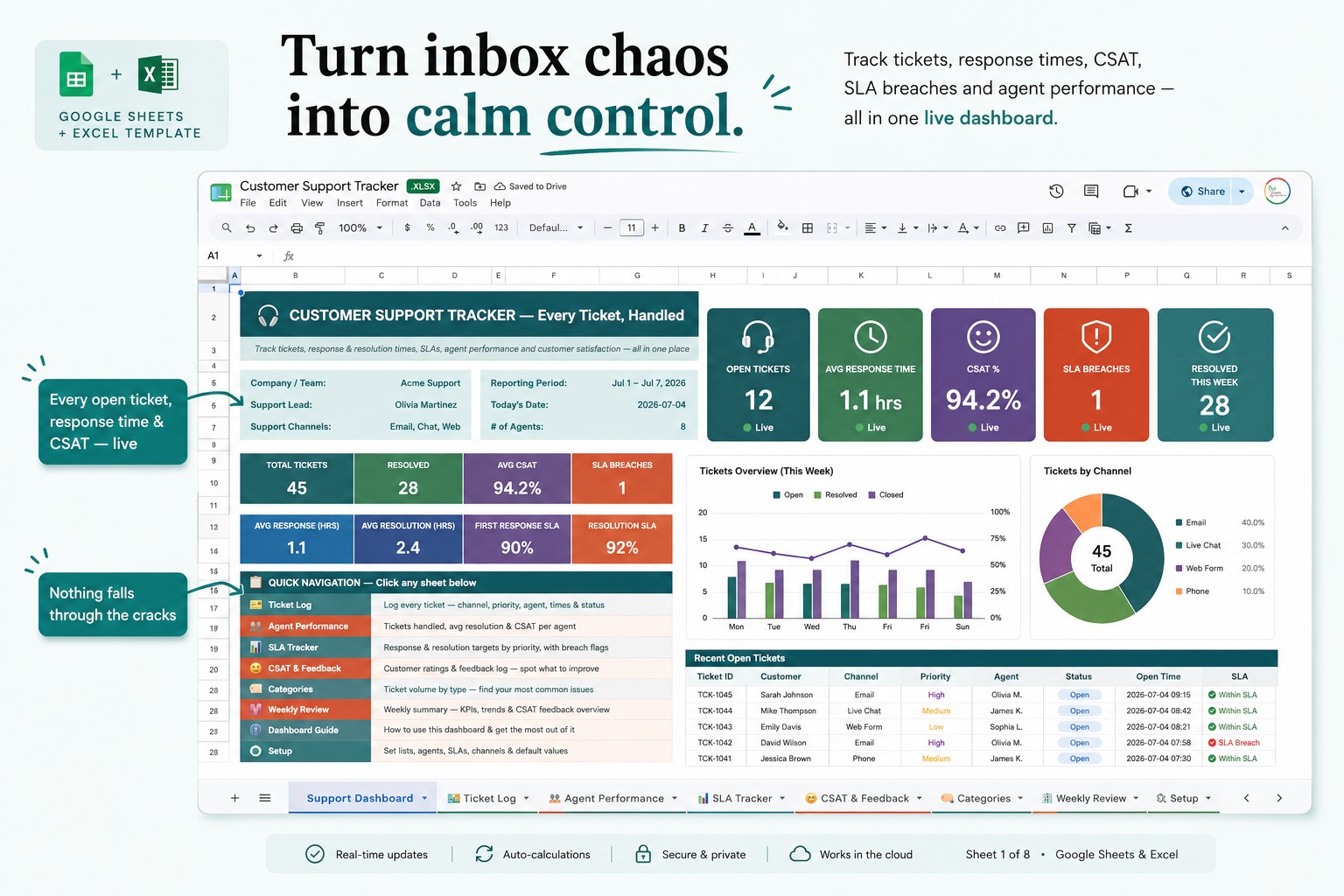
I built my own customer support tracker in Google Sheets — log every ticket with its status, track response times and SLAs, measure CSAT, see agent performance, and spot your most common issues, all on a live dashboard:
👉 Customer Support Tracker for Google Sheets & Excel
Whether you use mine or build your own, get your support out of your inbox. Even a simple tracker means no customer gets forgotten, every conversation has a history, and you finally know how you’re doing. For a small business, that organized, responsive support isn’t just tidier — it’s one of the best ways to stand out.
This reflects my own experience and is an organizational tool — not legal advice; keep customer data secure and follow your local privacy rules. How do you currently keep track of customer messages? Tell me in the comments.